Learn Anywhere
Access learning materials from your mobile device.
Experience a smarter, more flexible way to learn with the AcademyLab mobile application. Access your courses, follow your progress, participate in learning activities and stay connected to your learning journey wherever you go.
The AcademyLab mobile application extends your web-based learning experience to Android and iOS devices. Continue your courses, keep up with learning activities and stay connected to your academy — wherever life takes you.
Access learning materials from your mobile device.
Keep up with learning activities, notifications and course updates.
Follow your learning journey and access available learning assessments and achievements.
A focused mobile experience built around the way you learn. Browse courses, follow lessons, check your progress and keep track of your achievements from one connected application.
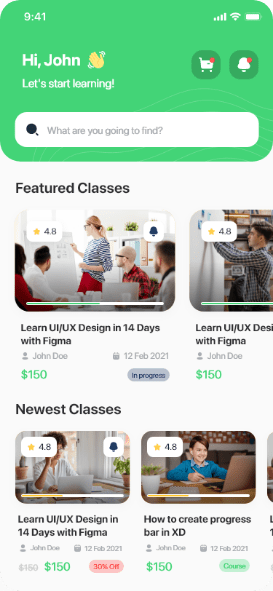
Interfaces shown are taken from the AcademyLab mobile application. Feature availability depends on your account, courses and administrator configuration.
The AcademyLab mobile application brings the core learning capabilities of the platform together in a single, carefully designed experience.
Follow course lessons in the format that suits you.
Learning & coursesBrowse and search courses and categories.
Learning & coursesSee how far you have come in each course.
Learning & coursesTake available quizzes and review your results.
Interactive learningKeep up with learning activity and course updates.
Student experienceAccess certificates you have earned.
Student experienceContinue learning across mobile and web.
Platform experienceSign in securely with your AcademyLab account.
Platform experienceOpen the download destination for your device and install AcademyLab.
Use your existing AcademyLab account — the same credentials you use on the website.
Browse your courses and pick up your learning journey where you left off.
Take your learning experience wherever life takes you. Download AcademyLab and stay connected to your courses.
 GET IT ONGoogle Play
Coming soon
DOWNLOAD ON THEApp Store
Open the store listing on your device, tap Install, then sign in with your AcademyLab account to continue where you left off.
At MultiLab Creatives, we bring digital ideas to life through innovative software solutions, professional application development and technology-driven experiences.
MultiLab Creatives provides the technology, implementation and branding behind the AcademyLab mobile learning experience.
Discover MultiLab CreativesNative and cross-platform mobile experiences designed around real users.
Reliable, maintainable software built with disciplined engineering practice.
Connected systems that bring web, mobile and learning platforms together.
Tailored configuration and branding that reflects your organisation.
Implementation, integration, customisation and branding delivered by MultiLab Creatives.
The AcademyLab online learning platform and the student learning experience.
The Rocket LMS mobile application technology that underpins the app experience.
Rocket LMS is a third-party learning management system. MultiLab Creatives provides implementation, integration and branding services and does not claim original authorship of the Rocket LMS source code.
Yes. You can download the AcademyLab application for Android from the Google Play destination configured by your academy. Use the Download for Android button on this page to open it.
An official iOS App Store destination has not been published for AcademyLab yet. Where an App Store listing is configured by the academy, the Download for iOS button on this page will open it; otherwise it is shown as coming soon rather than a broken link.
Yes. The mobile application connects to the same AcademyLab platform. Sign in with your existing AcademyLab account — there is no separate mobile-only account.
Yes. Course enrolments, progress and learning activity are connected to the AcademyLab platform, so you can continue learning across the mobile application and the website.
Offline availability depends on the capabilities of the installed application version and the content you have made available on your device. An internet connection is required to sign in, load new content and synchronise your progress.
Where live classes are enabled for your courses and by your instructor, compatible live learning activity can be accessed through the application. Availability varies by course and configuration.
Yes. Quizzes and assessments that are part of your courses, along with certificates you have earned, are available through the AcademyLab experience.
For help with the application, your account or a course, please contact your academy through the AcademyLab contact page or the support details provided by your institution.
Discover a smarter way to learn with AcademyLab, powered by innovative mobile technology.